Handle cross-account handoffs first with find and copy workflows between separate
monday.com accounts, then keep linked boards in sync and pull data from connected items.
Supports the current documented board-to-board functionality, with cross-account find and copy available for selected workflows.
Built for teams managing linked-board workflows today, with controlled cross-account handoffs where needed.
Built with monday.com Apps FrameworkCross-account find and copyPowered by Firebase
Features
Connected Automations supports the current documented linked-board workflows,
while cross-account support is presently limited to find and copy recipes.
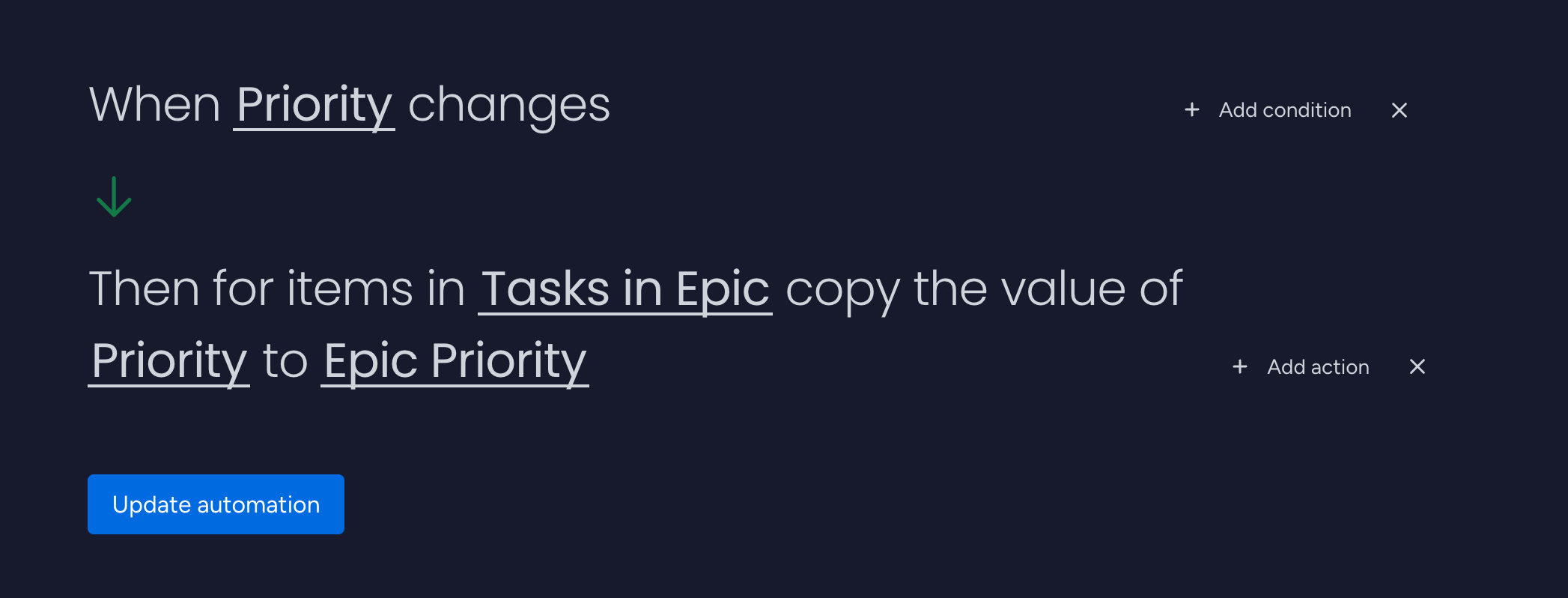
Propagate data to connected items
Automatically push values from a source item to its connected items so names,
dates, statuses, and other critical fields stay aligned across linked boards.
Supports text, numbers, dates, statuses, people, and more.
Ideal for master boards that define canonical values.
Cross-account copy is available for selected workflows.
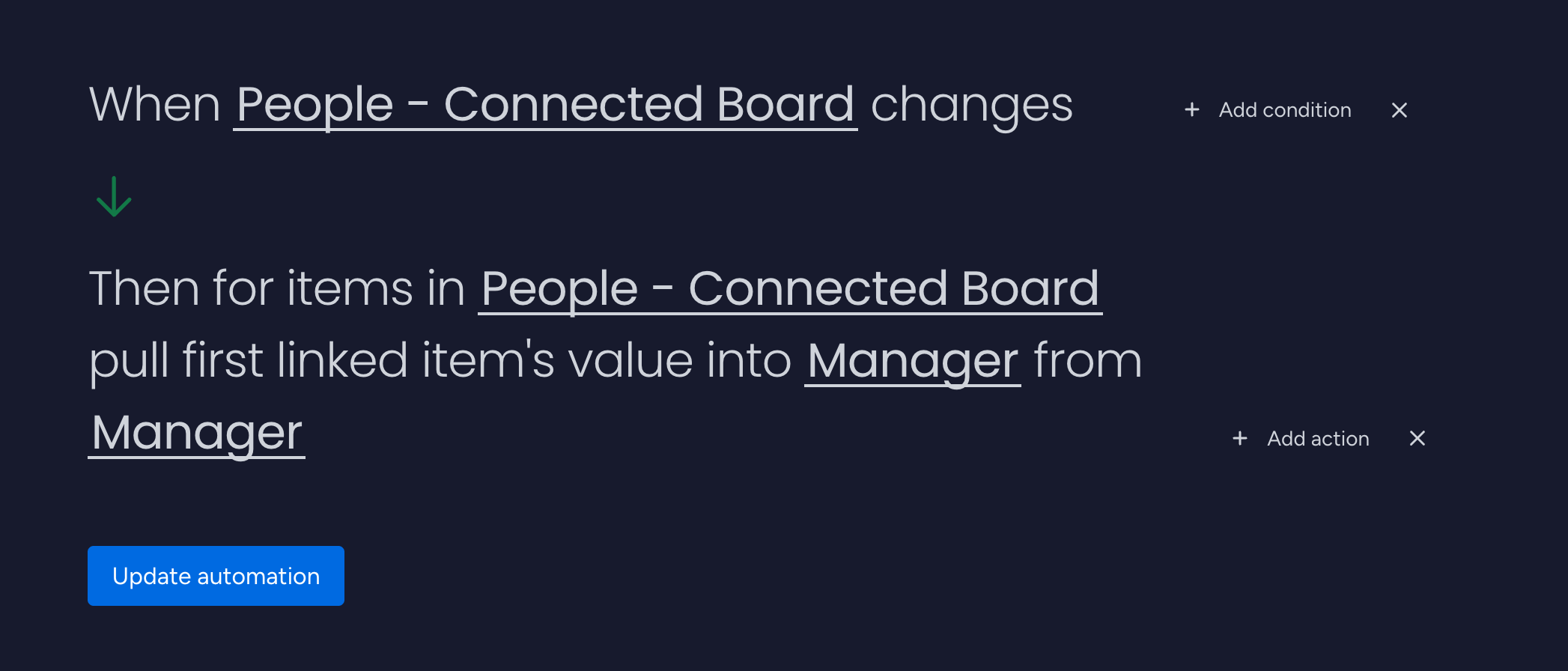
Pull data from connected items
Look up data from linked items and write it back into your current item for
reporting, summaries, and board-level coordination.
Pull client or project details into summary boards.
Mirror key dates or statuses in higher-level views.
Supports compatible column types with smart type handling.
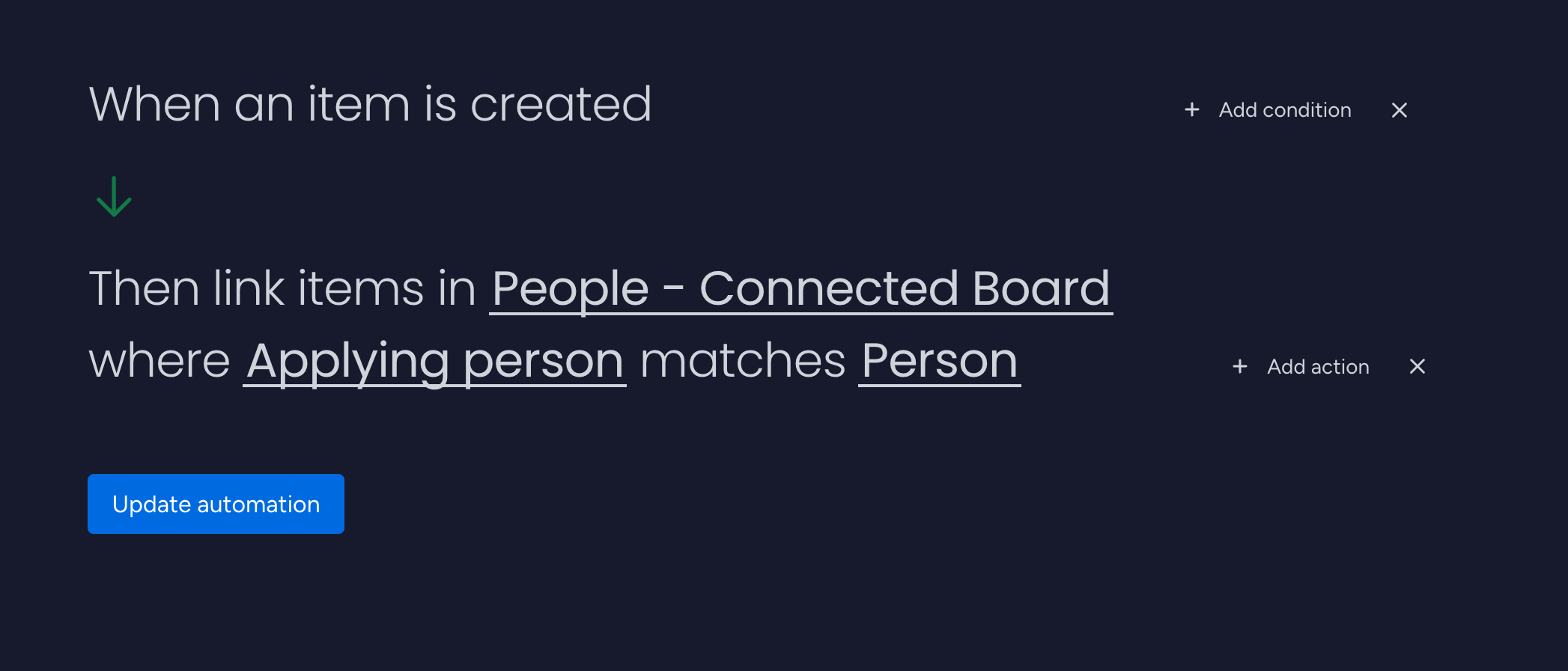
Find and link matching items
Automatically search another board for matching items by name, email,
reference key, status, date, and more, then create the links your workflows need.
Define the destination board and matching logic.
Create or update relation columns automatically.
Cross-account matching is supported for selected workflows.
Available automations
Connected Automations runs in the background based on the rules you configure in
your monday.com recipes:
When a column changes on a source item, propagate its value to one or more
connected items on linked boards.
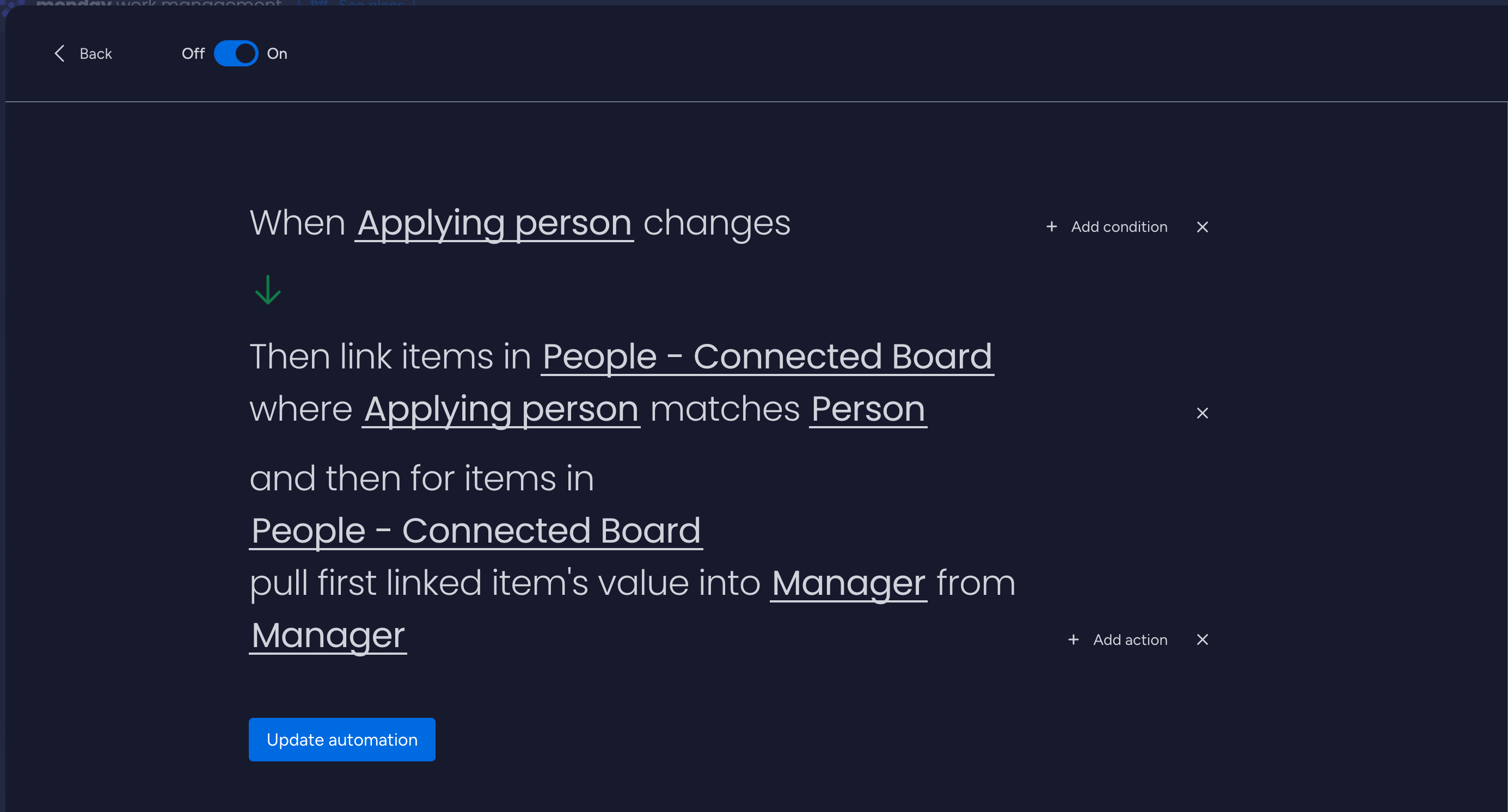
When linked items change, pull selected values back into the current item (for
example, names, statuses, or dates).
When items are created or updated, search other boards for matches and create or
update relations automatically.
For cross-account setups, current support is limited to find and copy workflows.
Supported column types
Each feature supports a different set of column types. Select a feature below to see which column types are
supported.
Copy data to connected items
Column type
Checkbox
Date
Link
Long Text
Name
Numbers
People
Status
Text
Checkbox
✓
✓
✓
✓
Date
✓
✓
✓
✓
✓
Link
✓
✓
✓
✓
Long Text
✓
✓
✓
✓
✓
✓
✓
Name
✓
✓
✓
✓
Numbers
✓
✓
✓
✓
People
✓
✓
✓
✓
✓
Status
✓
✓
✓
✓
✓
Text
✓
✓
✓
✓
✓
✓
✓
Pull data from connected items
Column type
Checkbox
Date
Last Updated
Link
Long Text
Name
Numbers
People
Status
Text
Checkbox
✓
Date
✓
✓
✓
✓
Last Updated
Link
✓
✓
✓
✓
Long Text
✓
✓
✓
✓
✓
✓
✓
✓
✓
✓
Name
✓
✓
✓
✓
✓
✓
✓
✓
✓
Numbers
✓
✓
✓
✓
✓
✓
✓
✓
People
✓
✓
Status
✓
✓
✓
Text
✓
✓
✓
✓
✓
✓
✓
✓
✓
✓
Find and link matching items
Column type
Checkbox
Creation Log
Date
Last Updated
Link
Long Text
Name
Numbers
People
Progress
Rating
Status
Tags
Text
Vote
Checkbox
✓
✓
✓
✓
Date
✓
Last Updated
✓
✓
Link
✓
✓
✓
✓
Long Text
✓
✓
✓
Name
✓
✓
✓
✓
✓
✓
Numbers
✓
✓
✓
✓
✓
✓
People
✓
✓
✓
✓
✓
✓
✓
Status
✓
✓
✓
✓
✓
✓
Text
✓
✓
✓
✓
Why cross-account workflows
Keep account boundaries for governance and client separation while still using
targeted find and copy recipes across accounts where manual handoffs are slowing teams down.
Secure separation
Maintain isolated accounts for governance, compliance, or client privacy while
limiting cross-account workflows to the specific fields you explicitly map.
Cross-account find and copy
Automatically find matching records in another account and copy approved values
without resorting to spreadsheets or manual lookups.
Current scope is explicit
Cross-account support is currently narrower than standard linked-board workflows,
which helps set clear expectations for teams adopting it.
Cross-account flow
Source account item -> Find matching record -> Copy approved values into destination account
Current cross-account support is focused on find and copy recipes.
Scope recipes to exact boards, columns, and match keys.
Monitor outcomes in monday.com activity logs.
How it works
Install from the monday.com marketplace, configure your standard linked-board
automations, and add cross-account find and copy recipes where needed.
1
Install and authorize
Find "Connected Automations" or "Lectonia Devs" in the monday.com Apps
Marketplace and authorize the boards or accounts involved in the workflow.
2
Configure recipes
Configure board-level copy, pull, and match recipes. For cross-account setups,
define the find and copy mapping and matching logic.
3
Run, monitor, and refine
Validate outcomes with activity logs and board views, then refine board-level
or cross-account recipes as workflows evolve.
You control exactly which boards, accounts, and columns are included in each workflow.
Cross-account use cases
Agency to client delivery
Find the matching client-facing item and copy approved milestones or delivery
details from your internal account.
Franchise operations
Find matching store or regional records and copy selected operational values
into a central HQ account.
Vendor collaboration
Match procurement, ticket, or fulfillment items between buyer and supplier
accounts and copy the fields both sides need to share.
Multi-brand groups and M&A
Coordinate shared records across separate brand accounts while maintaining
strict account isolation and selective field copying.
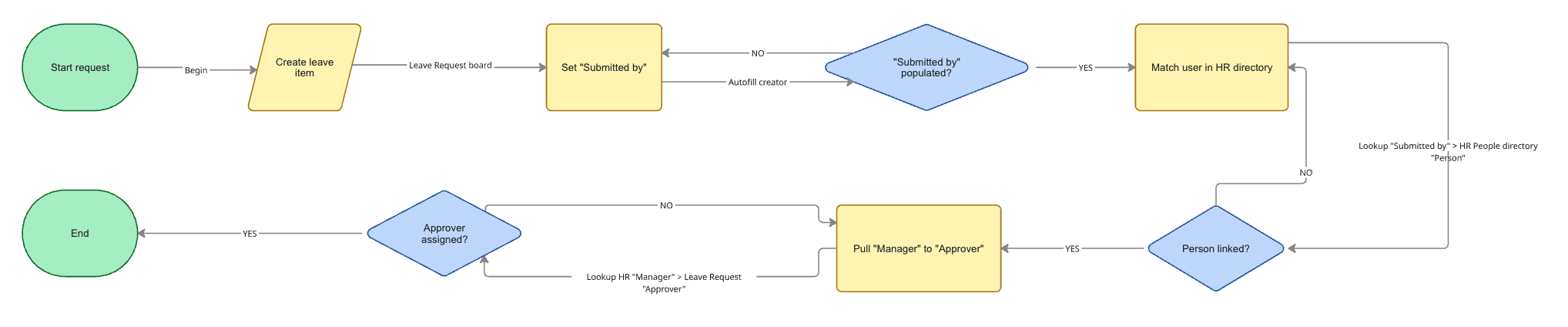
Workflow diagram
Pricing
Simple, predictable pricing for Connected Automations. Standard documented
functionality remains available, with cross-account find and copy included where supported.
Prices and limits on this page are for convenience only. Final terms are subject
to your monday.com marketplace listing or direct agreement.
Support
Need help or have a feature request? Reach out — we respond to every message.
We do not proactively contact users who install the app for
marketing or sales. We only respond when you contact us first or when
monday.com passes us a support request that you initiate.
The app requests only the scopes needed to run your configured recipes.
You choose where automation is allowed.
Data residency and processing
Your primary data remains in monday.com. The app processes selected fields
during runtime and stores only operational logs needed for reliability.
No unsolicited outreach
We do not contact installers for marketing or sales. We only reply to
support requests you initiate.
FAQ
Can this sync between different monday.com accounts, not just boards?
Yes, but the current cross-account scope is narrower than the standard
documented functionality. At present, cross-account workflows are limited to find and copy recipes.
How do permissions work across accounts?
Workflows run only where the app has been authorized. Each account and board
remains subject to that account's own permission model.
What happens if a match is missing in the destination account?
You can define fallback behavior per recipe, such as skipping updates,
creating links when found later, or reviewing exceptions in your logs.
Can we run one-way sync only?
Yes. Most teams start with one-way sync from a source-of-truth account and
add reverse flows only when needed.
Is there protection when both sides update at once?
Use clear source-of-truth rules and scoped recipes to avoid collisions.
Activity logs help you detect and refine edge cases quickly.